The most commonly used map apps in Korea are Naver Map, KakaoMap, and Google Maps.
I personally use KakaoMap in my daily life and still use it whenever I need directions or want to look up a place.
In this guide, I’ll explain the differences between Naver Map, KakaoMap, and Google Maps, which apps are commonly used by locals, and which one may be the most useful for your trip to Korea.
Step 1. Google Maps
Google Maps is probably the easiest option for international travelers because many people already use it in their home countries.
And yes, Google Maps works in Korea too.
However, people in Korea often use map apps for more than just directions. We also use them to check restaurant reviews, opening hours, announcements, and other business information.
Since Naver Map and KakaoMap are more widely used by locals, information on Google Maps can sometimes be less detailed or take longer to update.
That said, if you simply want to find a location and get directions to your destination, Google Maps can still work perfectly well for many situations.
My recommendation is simple:
Google Maps is fine for basic navigation, but if you also want to check local reviews, opening hours, and business updates, Naver Map or KakaoMap may be more useful.
Step 2. Naver Map
Naver Map is one of the most widely used map apps in Korea.
One of its biggest advantages is that it works closely with Naver, Korea’s most popular search platform. Because many Korean businesses manage their information through Naver, you can usually find plenty of reviews, photos, opening hours, announcements, and other useful information.
Compared with other map apps, Naver Map often has a large number of reviews, which can make it easier to check whether a restaurant, cafe, or other business is worth visiting.
When you first start using the app, creating an account or logging in may feel a little inconvenient.
However, once you use Naver regularly, your previous searches can be saved and connected across Naver services, making it easier to find places you searched for earlier.
After choosing your destination, you can also check different transportation options such as the subway, buses, walking routes, and more.
Having most of this information available in one place makes Naver Map especially useful when traveling around Korea.
Step 3. KakaoMap
KakaoMap is another popular map app in Korea and is commonly used alongside Naver Map.
Kakao is also the company behind KakaoTalk, the most widely used messaging app in Korea, so many Koreans are already familiar with Kakao services.
Overall, KakaoMap offers many of the same basic features as Naver Map.
One thing I personally like about KakaoMap is that you can install the app and start searching for directions without having to log in first.
I still use KakaoMap myself, and even without logging in, I can quickly search for unfamiliar places whenever I need directions.
I also use map apps to check local reviews and ratings for cafes and restaurants.
From my personal experience, ratings on KakaoMap often seem a little lower or more conservative than ratings on Naver Map.
Naver usually has a much larger number of reviews, while KakaoMap can sometimes give me a slightly different impression of the same restaurant.
Because of that, I often check both Naver Map and KakaoMap before deciding where to go.
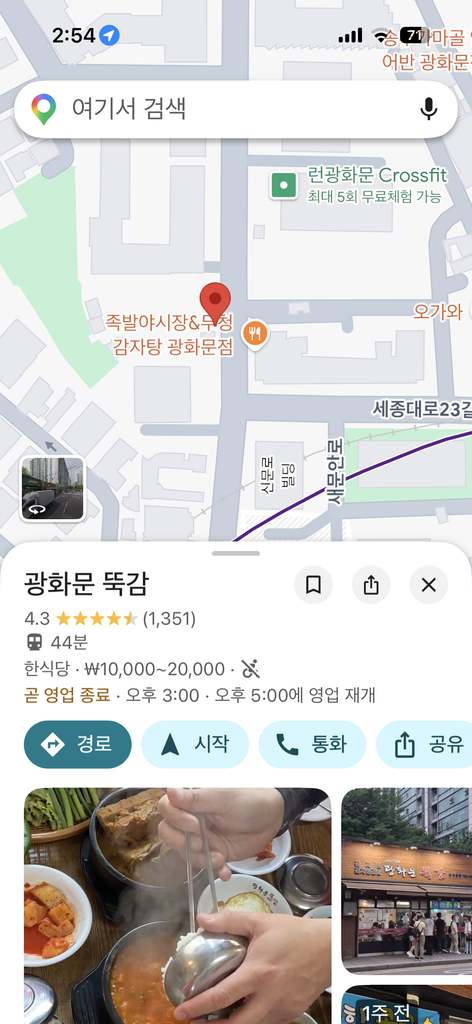
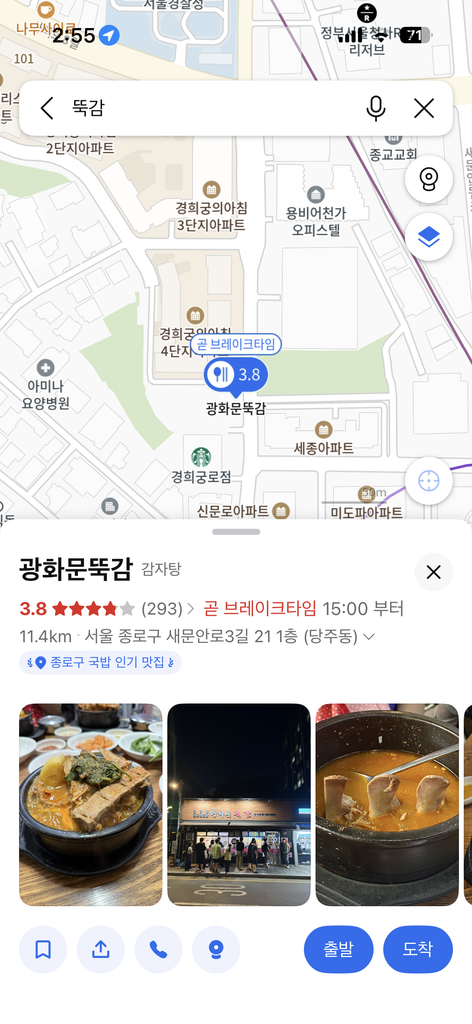
You may even notice that the exact same restaurant has noticeably different ratings or reviews depending on which app you check.
Personally, I continue to use KakaoMap because I can use it without logging in and because I find its ratings useful when comparing places.
Step 4. So Why Do I Recommend Naver Map?
| Situation | Recommended App |
| First-time visitor to Korea | Naver Map |
| Subway & Bus | Naver Map / KakaoMap |
| Restaurants & Cafes | Naver Map / KakaoMap |
| Places already saved on Google | Google Maps |
| My Personal Recommendation | Naver Map |
You may be wondering:
If I personally use KakaoMap, why do I recommend Naver Map to travelers?
The main reason is that traveling is a little different from everyday life.
As I mentioned earlier, KakaoMap is great for directions, but in my experience, business information such as special opening hours, temporary closures, or announcements is sometimes updated more consistently on Naver.
There have been times when I went somewhere without realizing that the business had changed its hours or was closed.
For locals, that may just mean changing plans and going somewhere else.
But when you are traveling, you may have limited time and may have traveled a long way just to visit one particular place.
For that reason, I usually recommend Naver Map to first-time visitors to Korea, especially if you want to check opening hours, reviews, and business information as well as directions.
Step 5. How I Actually Use a Map App
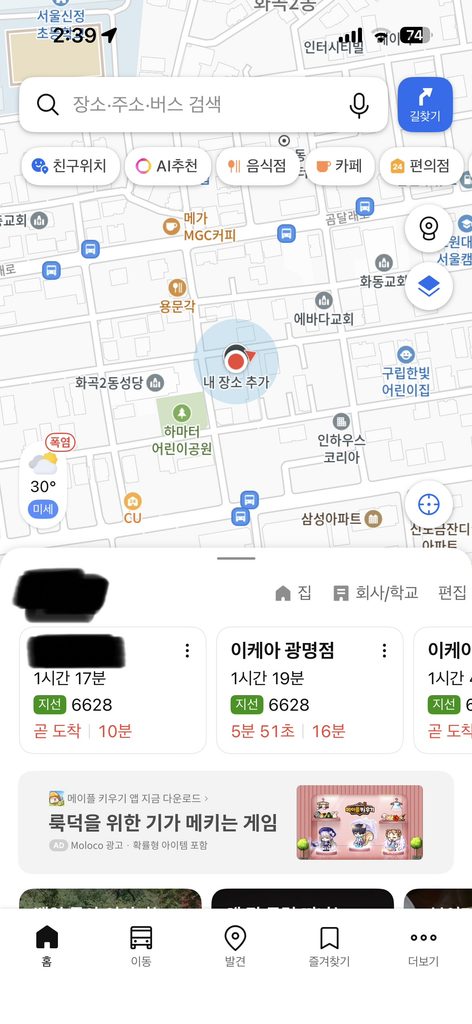
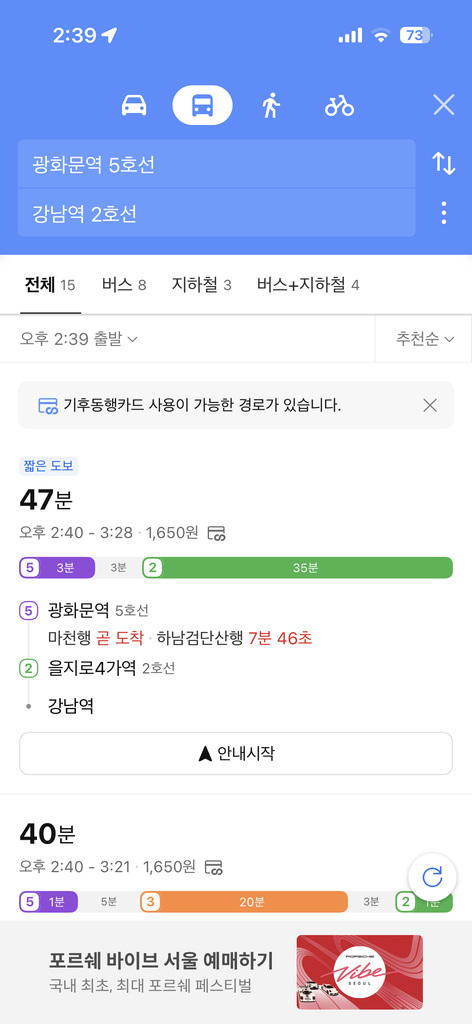
Here is an example using KakaoMap, which is the map app I personally use.
At the top of the screen, simply enter the name of the place you want to visit.
Below your current location, you can also see places you recently searched for, which makes it easy to check them again later.
For example, if I search for directions from Gwanghwamun to Gangnam, the app will show me some of the fastest available routes.
I can then choose between options such as the subway or bus and follow the directions.
Another useful feature is that you can change your departure time.
This means that instead of only checking the route based on the current time, you can look up transportation options for the time you actually plan to leave.
This is especially useful when planning your day in advance.
Local Tips for Using Map Apps in Korea
- When searching for a restaurant, always check its opening hours before visiting. I also recommend checking reviews and which floor the restaurant is located on, especially inside large buildings or shopping malls.
- Don’t just check which subway station is closest to your destination. Check the exit number as well. Choosing the right subway exit can save you a lot of walking.
- Sometimes the escalator may be on the opposite side from the exit you originally planned to use. If you have heavy luggage or have already been walking all day, it can sometimes be easier to take the escalator and walk a little farther above ground.
- Public transportation routes are usually shown based on the time you search. If you are planning to leave later, make sure to change the departure time or check again closer to when you actually leave.
- If you need to call a restaurant or shop, many map apps have a call button on the business page. You can usually tap it to call the business directly without manually entering the phone number.
Even if you are already comfortable using Google Maps, I recommend trying Naver Map or KakaoMap while traveling in Korea.
They may feel unfamiliar at first, but being able to check local reviews, opening hours, announcements, and detailed transportation information can make your trip much easier.
If you have any questions, feel free to contact me through the email address on the Contact page. I’ll do my best to help.